
Management Console
Release Notes
What changed in the Rough management console, newest first.
Loading Screen
When loading Rough, you will now see a brief "Loading…" screen while the app is initializing.
New UI for Linking Insights
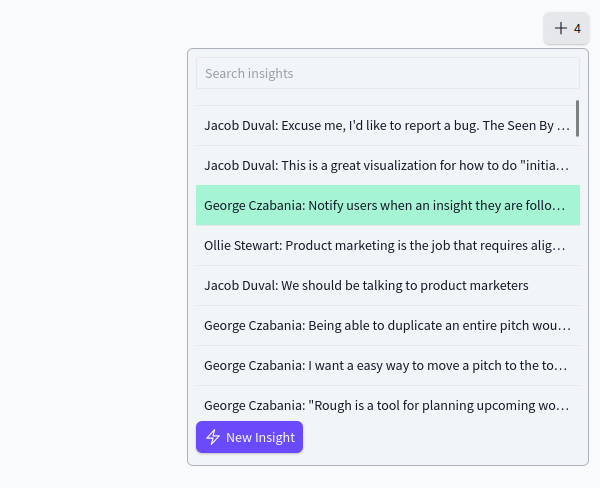
When linking an insight directly to a pitch, Rough now shows the name of the person associated with the Insight. This also means you can search for an insight by using the person's name.
We've also added a button to create a New Insight from within a pitch. The new insight will be automatically linked to the pitch as a Related Insight.
Archived Banner
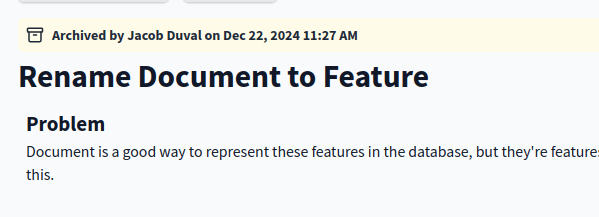
When a pitch has been archived, Rough now makes this obvious with a clearly visible banner at the top of the page. The banner shows when the pitch was archived and who archived it.
Delete Pitches
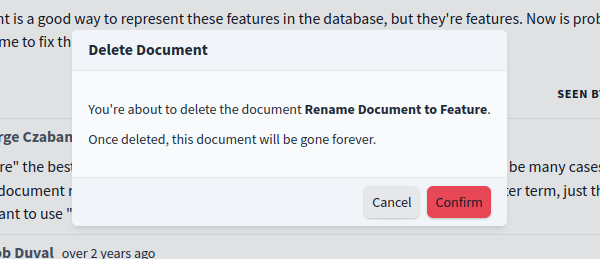
Previously, it was not possible to delete a pitch in Rough once it was published.
Today, we've added the ability to fully delete pitches from Rough.
You must first archive a pitch before you can delete it. We recommend keeping pitches archived if possible. Deleting a pitch cannot be undone and removes all content and comments.
- Fix bug with removing yourself from a workspace
- Add a new settings page for "Leave Workspace."
- Fix bug with AI composer
- Update models to use Anthropic Claude 4.5 and OpenAI GPT 5.2
- Highlight the Inbox when there are new notifications
- Viewing the inbox will change it to grey
- Increase OAuth2 refresh session token timeout.
- If you use the Slack Rough integration, you won't be asked to log in multiple times.
- Fix annoying bug with the text editor formatting popup menu ("bubble menu") appearing multiple times and not disappearing.
- Sync status is now a button you can click to force a sync (could help with updating the UI when it's not syncing)
- Fix bug with Block Actions context menu being displayed underneath drawings.
- Minor UI improvements to comment threads (better spacing and consistent buttons).
- Hide lock and duplicate actions for archived blocks.
Ship some critical improvements to the Fizzy Integration!
- If your verification code expires you can can now cancel and retry the connection process (previously this was not possible).
- Insights that contain images were previously failing to be sent to Fizzy. We've fixed it and also made sure the images are sent over to Fizzy as well!
- Increase height of the "Create Pitch" and "Create Insight" dialogs.
- Fix bug with workspace data import failing to import blocks since we shipped the Seen By feature.
We are excited to ship a new integration with Fizzy!
After connecting your Rough account to your Fizzy account, you will be able to create Fizzy cards directly in Rough. Any Rough Insight can be sent to Fizzy with a single click, copying over all the content with an AI-generated title.
We are using this internally to track bugs that are first reported in Rough as todo items in our Fizzy board.
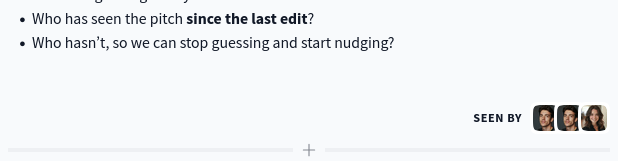
Add border to Seen By avatars
We've added a border to the avatars in the new 'Seen By' section and adjusted the design so that the avatars appear stacked on top of each other.
Remove countdown before creating a Sandbox account
We've made a small change to the Rough Sandbox (available at https://in.rough.app/demo). When we first built this, it was almost instantaneous, so we added a 3-second countdown timer to give people a chance to cancel in case they didn't want to join the demo.
However, the time it takes to join the sandbox has increased. We are going to investigate why and do what we can to make it faster. In the meantime, we've removed the delay and instead start the joining process immediately, while showing a spinner.
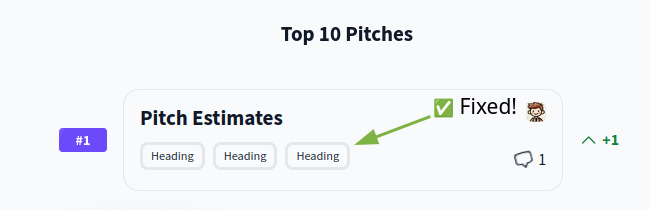
Fixed Block headings not updating
We've fixed a bug that prevented block titles from always updating on the Top 10.
Previously, the block titles would only be updated when our server processes a block update. In some cases, this may not happen, for example, if you are offline or if the app hasn't synced in a while. Viewing the Top 10 would have shown the previous block title (often the default "Heading").
Now, we update the block title as you edit the text, so you will always see the correct heading in the Top 10, even if you are offline.
Re-center layout of login and signup pages
These forms were being displayed at the top of the screen, instead of in the center of the window. Not a big deal, but it's fixed now.
Re-enable toast notifications on the user profile screen
We have restored toast notifications to the user profile screen. You probably didn't notice they were gone - but they're back now!
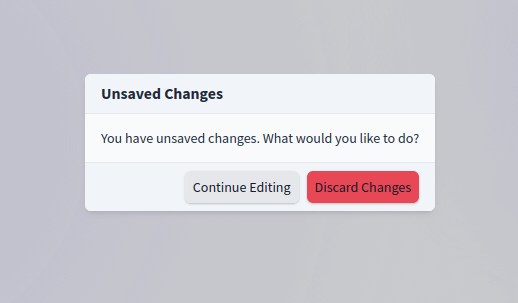
Smarter behaviour when cancelling an edit
When editing an Insight, if you cancel, we will prompt you to confirm that you want to discard your changes. Previously, we would prompt you, even if you hadn't made any changes!
Rough is smarter now, and if you haven't actually made any changes, we will let you cancel without question. If you have made changes, Rough will still ask you to confirm.
We've also made some minor improvements to the UI of the confirm dialog.
Only show the last 7 days of activity
To improve performance and reduce noise on the page, Pitches and Insights now only show activity events from the last 7 days. You can still access the entire history simply by clicking the "Show all activity" button.
Fix Inbox on mobile devices
We accidentally broke the inbox page on mobile devices - it would appear blank when viewed. Now it's working as expected again! You should also notice that it loads faster.
Fix Search on mobile devices
We've also fixed a long-standing bug that was preventing people from being able to search on a mobile device.
Hide comments on archived blocks
Previously, archiving a text block would still show the comments on it - we've now fixed that, and it looks much better.
Fix Context Menu position in Drawings
We fixed a bug with the right-click context menu not appearing in the correct position when using the drawing feature. Now the context menu appears directly under your cursor (where you would expect it!).
Display the correct list position
At the top of each Pitch, Rough shows all lists that the pitch is in (including your Wishlist) and the position of where the pitch sits in that list.
Previously, the "Your Wishlist" list would always show the pitch at position #1 - even when it wasn't! We've fixed that bug and ensured that Rough displays the position correctly.
Improve performance of Released and Archived lists
You may notice it is faster to open the Released and Archived lists in Rough now.
These two built-in lists cannot be manually sorted, so we can easily virtualise them and only render the pitches that are on the screen, even if you have hundreds of pitches.
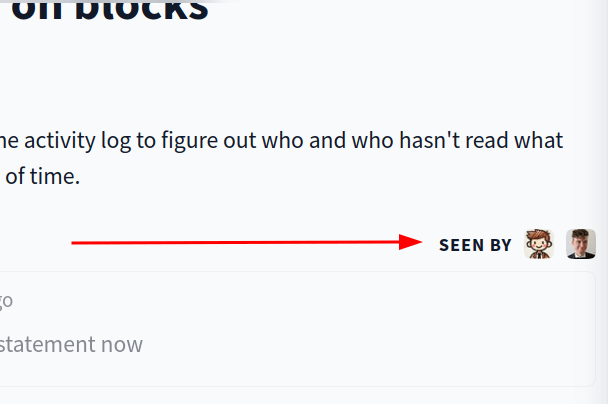
Seen By / Not Seen By
We've added the first iteration of Seen By into Rough. This feature shows which people have seen each part of a Pitch since it was last edited.
We hope that this will help you build alignment in your team by being aware of who is up to date (and who may need to follow up with).
Join our Slack Community
We've started a new Slack Community! You can find the invitation link in the Help button (located in the bottom left corner of the app), labeled "Chat with us on Slack."
Smoother invite flow for new users
We have continued to refine the invitation flow for new users.
When a new user is invited (either via an invitation link or a direct email), they will automatically be directed to the workspace after signing up. Previously, the user would be asked to confirm the invitation.
For security reasons, Rough will continue to ask users to confirm invitations if they are already in other workspaces.
Fix z-index bug with the block drag handle
With yesterday's changes, we accidentally set the z-index on the block drag handle to be way too high. This caused the handle to appear above many other UI elements, including the header and sidebar. This has now been corrected.
Perfected Inbox scrolling behaviour
When jumping between inbox notifications, those that reference a comment will cause the page to automatically scroll down to bring that comment into view.
Previously, the page would always animate the scroll down to the comment, which could be annoying as you jump through notifications. Now, we instantly jump to the comment so it's less distracting.
However, if you switch between two comment notifications that are for the same Pitch/Insiht, we smoothly scroll between them.
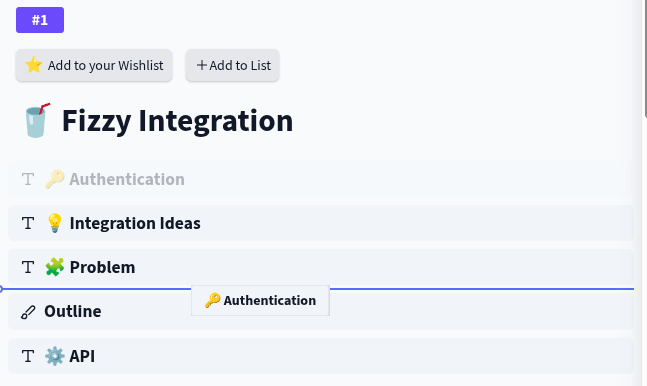
Improved drag and drop
This morning, we fixed a bug that caused the drag-and-drop indicator to display in the wrong position.
Then we decided to make a big improvement to drag and drop to make it much easier to work with large pitches! Now, when you drag a block, Rough collapses the content so you can see all the headings on the page at once. Simply drop the block in the collect location, and then the blocks are displayed as usual. It's a much faster way to move blocks around a pitch.
We've also improved the way the drag handle is displayed on small screens. It now sits next to the block title, reducing the amount of wasted vertical space.
Added demo video
Jacob has recorded a 5-minute introduction video for the Rough demo! When you view the Rough Demo Workspace, you will now see this video on page load. You can also access it from any other workspace via the Help menu.
Updated help menu
We've had a link to "Join our community on Slack" in our help menu for a few months. We recently noticed that this link has expired and is no longer functional. We've decided to remove this link as the Slack community hasn't taken off.
The best way to get in touch with us is via the "Send us an Email" button in the Help menu.
Prevent page shift when opening modals
Previously, opening a modal could cause the page to shift slightly to the right. This was due to the scrollbars being hidden (to prevent accidental scrolling of the background page).
We've fixed this so that the background stays in place while the modal is opened and closed.
Fix bug with searching labels
We've fixed a bug with the Add Label button on the Insight card. Previously, searching for a label would cause the app to crash! This has been resolved, and labels now work as expected.
Fix issue with block actions
We fixed a glitch with the block editing menu that was causing the ⠿ icon to act unpredictably. We've also made sure this button is always visible when using a touch device and is positioned on the screen.
Improved performance of loading the Inbox
You should notice that opening the Inbox is much quicker now, especially if you have many notifications.
Improved performance of displaying Pitch
We've improved the performance of displaying a pitch, so it should feel a bit faster when navigating between pitches.
Continuing to improve Invite Links
Recently, we improved the Invite Link experience, but we overlooked users signing in with Google.
Today, we've fixed that - so users who click on an Invite Link and then sign in with Google will now be brought directly into the workspace, eliminating the need to find the Invite Link again.
We've also updated the Forgot Password form, so if someone attempts to join a workspace with an existing account but first needs to reset their password, they can do so and then be brought into the workspace afterwards.
Link to changelog
We've added a link to the changelog from within the app. If you click on the Help icon in the bottom left corner, you will now see an option for "Product updates," which will open this changelog in a new tab.
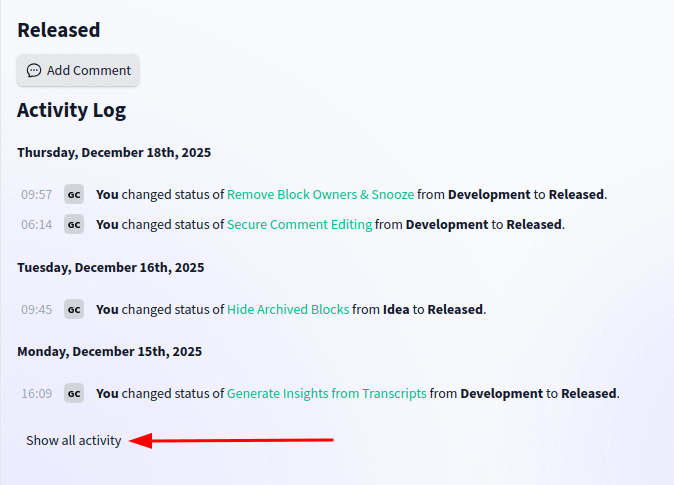
Only show the last 30 days of List activity by default
Previously, when viewing a List, the Activity Log section would display the entire history of the List. Seeing the full history is rarely useful (the relevancy of events decreases quickly over time). Displaying hundreds of events would also cause a noticeable lag when the page loads.
With this update, the List Activity Log now only displays events from the last 30 days. We've also added a button to load the entire history.
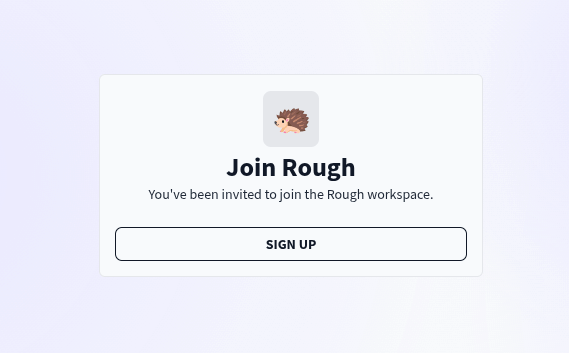
Improved invite link experience
We've improved the experience for users who join your workspace via an Invite Link.
New users are prompted to sign up for a Rough account before they can join your workspace. Previously, after completing the signup process, users would be taken to the User Profile page. This led to confusion, as there was no way to accept the workspace invite, and the user would have to click on the Invite Link again to join the workspace.
With this update, after completing the signup process, the user is instead prompted to accept the invite and join the workspace.
Always show the insert bar on the final block
When editing a Pitch in Rough, if you hover over a text block or drawing, the Insert Bar appears below. You can use this bar to add new blocks or comments.
However, if you are not hovering, the Insert Bar is not visible - which could lead to confusion about how to insert new content.
We've adjusted the UI so that the Insert Bar is always visible at the bottom of the Pitch, even when you are not hovering. This is a good trade-off between helping users use Rough while minimising visual noise.
Polish pitch UI layout
We've made some minor improvements to the layout of content on a Pitch. The changes restore the visual alignment of text and comments.
Fix emoji picker
We've fixed a bug that was preventing the Emoji Picker from appearing when trying to add a reaction to an Insight.
Fix list notifications
We've fixed an issue with the Inbox being unable to view some notifications.
It was not possible to view notifications that referred to actions taken on the built-in Rough lists (Pitches, In Progress, Released, etc). This has now been fixed, and all notifications should work as expected.
Fix deleting insights with comments
We've fixed a bug that was preventing the deletion of Insights with comments.
Improve Pitch UI on small screens
We've adjusted the UI layout for Pitches, moving the status and owner to be near the title. This improves the display on small screens (such as phones), preventing the horizontal scrolling issues on this page.
Highlight relevant comment thread in Inbox
Rough has a nice new improvement to help you out when viewing an Inbox notification that refers to a comment thread. Upon clicking on the notification, Rough will scroll down the page and highlight which comment thread was updated. This will save you time and confusion when responding to comments in Rough.
Tooltips on Comment Dates
In Rough, comments are displayed with a relative time ("5 minutes ago"). This works fine for recent comments, but can be vague for comments posted weeks ago ("about 2 months ago"). To help you know exactly when a comment was posted, you can now hover over this date to see a tooltip with the exact time that the comment was posted (Nov 14, 2025, 2:23:13 PM).
Fix issue with old events not being parsed correctly
We recently added some extra metadata to events, which was not done in a backward-compatible way. You may have seen notifications in your Inbox or events in the activity log that showed an error like "Could not parse NOTE_UPDATE_STATUS".
We've made these changes backward compatible, so for new events, you will see the extra metadata, and older events will appear readable, but without the additional detail.
Events impacted:
- Deletion of Pitches (
DOCUMENT_DELETE) - Removing a Pitch from a List (
SEQUENCE_DOCUMENT_DELETE) - Publishing an Insight (
NOTE_UPDATE_STATUS) - Resolving of comments (
DOCUMENT_COMMENT_RESOLVE,NOTE_COMMENT_RESOLVEandSEQUENCE_COMMENT_RESOLVE)
Fix minor UI issue with Workspace Activity events
Some events on the Workspace Activity page may appear incorrectly. We've tidied that up.
Fix issue with app not loading in iOS Safari
We've fixed an issue that was preventing Rough from working on iPhones. Previously, you may, trying to load the app may have resulted in an empty screen or an error message. The app should now load correctly and work as expected. We apologise for any inconvenience this may have caused.
Fix issue with navigating on touch devices
We've fixed a bug with the Workspace menu, which was not responding to interactions on touch devices. With this fix, you are now able to switch workspaces and access the workspace settings again as usual.
Workspace data export now includes more data
Since the beginning of Rough, you've been able to export all the data associated with your Rough workspace as a single JSON file.
This also means you can clone a Rough workspace using our Import feature, which imports data from a Rough export.
Today, we've added support for some more data types that we previously missed:
- Media files that have been uploaded
- Mmoji reactions on content
- Related connections between Pitches
- Related connections between Insights
- Notification subscriptions of each user
Limiting data import to only new Workspaces
Using the data import feature may result in data loss if it is applied to an existing workspace. It's only safe to use the import feature on a newly created workspace.
We've now implemented a safeguard in the UI that disables the import feature if we see that you've already created data on the workspace.
Workspace data statistics
We now list how many pitches, insights, comments, and custom lists you have on the data page.
This can also help you verify that all data has been imported correctly.
List update notifications
You can now subscribe to notifications for any list. When you are watching a list, you will receive notifications whenever anyone:
- comments directly on the list
- adds/moves a pitch to the list
- changes the priority of pitches in the list
You are automatically subscribed to any lists that you have created yourself.
Separate notifications for comment threads
Any notifications for comments are no longer squashed together with other notifications. Previously, if someone commented on a thread you were watching, and then another action was performed (such as renaming the pitch title), you would only see the rename notification.
Now, the inbox keeps those notifications separate, so you're sure you'll always be informed when someone comments.
Move "Delete Workspace" settings
We've moved the option to delete the workspace out of the "General" settings page and into its own tab.
Easily duplicate Drawing and Text blocks
We've added a new "Duplicate" action for Drawing and Text blocks. This creates a copy of a drawing or a text block, saving you from manually copying and pasting the content yourself.
Insert content below a Drawing
Drawing blocks now feature an Insert Bar below them (similar to Text Blocks), so you can insert another block below a drawing.
You can also use this to add comments to a drawing.
Stop the window from scrolling while a confirm dialog is open
Previously, when a confirm dialog was displayed, you could still scroll the main window, which didn't feel right (dialog modals typically block scrolling). So we have changed it so that while a modal is visible, you can't scroll the window.
Fix bug with deleting insights
Since we introduced notification subscriptions, an issue arose that prevented deleting any insights that any user was watching.
This has been fixed, along with ensuring that other watchable items (pitches, lists, comments) will also be deleted without issue.
API: Removal of block.parentBlockId
We've removed the ability to nest blocks under other blocks. This was a feature we added early in the development of Rough, but we haven't used it in years. We don't expect it to impact any customers.
It is a breaking API change - as the /api/v1/block endpoints no longer return or accept the parentBlockId property.
Smarter Inbox URLs
When viewing notifications in the Inbox, the browser URL will now include information about what item the notification is related to. For example, if the notification is for Pitch #27, the URL will include P-27 in the path.
This is useful if you want to share a URL with a colleague. Rough now knows how to redirect them out of the Inbox and to the correct place in the app.
We also include a name in the URL, for example, if you are viewing a Pitch titled "Herculean Infrastructure," then the inbox URL will display /inbox/P-27/herculean-infrastructure so you can get context without having to view the app.
List comments and activity log are back
You can now read comments on lists and see the activity log for each list without having to click a button. This is helpful when viewing notifications on a list.
The UI for this is still in development, and we realise it can be quite overwhelming. We are planning some improvements for that soon.
Display list notifications
Yesterday, we implemented the necessary backend changes to send notifications on list comments - but forgot to update the frontend to support them!
You will now see notifications for lists in your inbox. Viewing the notification will show you the list of comments and the activity log. Soon, we hope to extend this to also show you the list of pitches itself.
Notifications are now sent when you @mention people in lists
You've always been able to mention people in lists, but now we actually send them a notification to let them know they've been mentioned!
Tracking changes to pitch status
We've improved the way we display changes to pitch status. Instead of just saying that "Diane changed the status," we now include details about which status the pitch has been changed to (as well as what the previous status was).
Automatically subscribe to pitch notifications
If you change the status of a pitch that you aren't currently subscribed to, you will now be automatically subscribed. This way, if there are any updates on the pitch, you will receive notifications in your inbox.
You may opt out of these notifications if you are not interested.
Tracking comment activity on lists
We've updated the list event log to capture info about comments. Whenever a person creates a new comment, deletes a comment, resolves a comment, or edits a comment, we will add that event to the log.
This isn't that exciting, but it is a key step as we develop the Rough Inbox - as these events will soon trigger notifications and allow you to keep up to date with conversations that happen at the list level.
Watch updates on an insight
We've added a button to subscribe to updates on an insight. The person who creates the insight will automatically be subscribed. You can also choose to opt out of notifications on a particular insight if you no longer wish to receive notifications about it.
Watch replies on any comment
We've also added the option to subscribe to replies on comments. If you reply to a comment, you will automatically be notified if anyone else replies in the thread - with the choice to opt out of notifications. You can also opt in to be notified when someone replies, even if you haven't participated in the thread.
More time to read toast notifications
We've slightly increased the duration for which toast notifications are displayed.
These are the notifications at the top of the screen; they are now displayed for 3 seconds. The information they display isn't critical, so if you miss it, it's not a big deal. Previously, it would disappear quite quickly, and might have left you wondering what you missed.
Watch for new insights
Recently, we stopped sending notifications to all workspace users when a new insight is published.
However, some people may want to know about all the new insights and track them in their Inbox. We've added a new button to the insights page that allows you to opt in to new insight notifications.
Watch for updates on a pitch
We've also added an option to opt in to updates on a particular pitch. The person who created the pitch, and the person who owns the pitch, are currently always notified, but now there is an option to watch the pitch and receive inbox notifications when the content is updated or someone comments on it.
Prevent editing other people's comments
Previously, it was possible to edit or delete comments written by other people in your workspace. This didn't feel right; comments are very personal and should only be able to be changed by the person who originally shared them.
With this release, comments now work as expected, and only you can edit or delete them.
Removing block owners
Each pitch in Rough is owned by a specific person, usually someone in your workspace (but not necessarily). Previously, Rough also allowed you to specify an owner for each text block in a pitch - so you could know who is responsible for the different parts, such as the problem definition or the scope.
However, we haven't found this feature to be useful, so we have removed it from the app. We may revisit this idea in the future, but for now, the workflow is simpler without it.
Removing snoozed blocks
We are removing the button to "snooze" a block in a pitch. We used to have a feature for showing "stale" blocks - those that hadn't been edited in over 3 days, but this became more annoying than useful, so we stopped highlighting stale blocks.
Snoozing was a way to temporarily ignore the stale block warning - and since that warning doesn't exist, it doesn't make sense to keep this button.
Less noisy notifications
We've reconfigured the inbox notification system. Now, you should only receive notifications about events that are actually important to you - rather than being notified every time someone does something.
Transparent page header
We've restyled our page header to be transparent, with a frosted glass blur effect - and we think it looks pretty cool.
Default page is now the Top 10 pitches
Our current focus for Rough is to help you shape and prioritise your pitches. We have changed the default page you see when opening your Rough workspace to be the Top 10 pitches (previously it was the Insights list). Insights are a powerful part of Rough, and we will return to them in the future - but for now, we want to make Rough the best place to shape work.
The "Insert Media" button has moved again
We've moved the little paperclip icon from below the content editor. Now it appears in the little pop-up menu when you select text with the editor.
To insert media, type a few characters, select them, and then click the paperclip icon that appears. We've found that most times we usually paste images, so the paperclip icon isn't that useful.
Relaxed timestamp increments
Previously, comments and insights would show "posted 5 seconds ago" with that number incrementing every second, which can be distracting and isn't that useful.
We now round up and show "less than a minute ago", which feels friendlier.
Unreleasing teams
We added support for Teams of people very early on in the development of Rough. However, we haven't been using Teams ourselves - and no one else has either. So we've decided to remove it from the app - making the app slimmer and easier to maintain.
We've been thinking about how to better support organisations with multiple teams and products. This will likely involve a new Teams feature that allows for multiple Top 10 boards.
Slimmer pitches with Archived blocks
When a pitch contains archived blocks, we now hide the content of those blocks. Previously, we would show the content greyed out - but it would still take up space in the document, encouraging people to delete the block to make the pitch easier to scan.
Now, we just show the pitch title and who archived the block.
Fix syncing issue
We've fixed a bug in our syncing code that would make the workspace appear to be missing content (such as text blocks in a pitch).
The issue only affected people logging into Rough on a new device. No customer data was lost. If you did experience this issue, the next time you open Rough, your workspace should appear complete as usual.
Disable preloading of media assets
We no longer preload embedded audio and video media files. This reduces bandwidth usage at the trade-off of slightly longer delay when initiating playback.
Sidebar updates
We are starting work on a real Inbox for Rough.
In preparation for this work, we've renamed the "Updates" page to "Inbox," which will be redesigned to display important notifications.
The Activity page has also been moved into the "Show more" section of the sidebar. It is named "Audit > Workspace Activity".
Improved App Performance
We've rewritten core internal data access code - it is now up to 30x faster for us to load data into the app.
This means that using the app should be a bit snappier - especially on larger workspaces.
Moved insert attachment button
We've moved the location of the button to insert a file into an insight, pitch, or comment.
Previously, this button was nestled with the text editor itself and was only visible when you hovered over the text area. This caused issues on touch devices (which don't support mouse hover), and sometimes the button overlapped text, harming readability.
The insert attachment button now sits below the text editor.
Fixed uploading asset UI on mobile
When uploading files on mobile phones, the upload UI would be too wide and cause horizontal scrolling.
We've fixed that now, so that the upload indicator looks great on any size screen.
Improved media support from Slack
The official Rough + Slack Integration now supports capturing image, video, and audio attachments! This will be embedded into the Rough Insight and can be played back in the app.
You can install our Slack integration via https://slack.rough.app/slack/install.
Fixed image size detection when uploading images via API
We've fixed an issue with our API - so now media uploaded via our API endpoint POST /api/v1/asset will be inspected, and details such as the width, height, and duration will be attached as metadata.
This means that when an asset is embedded in an Insight, it will be displayed correctly.
Improved User Avatar Upload
When you upload a custom avatar for your user profile, you will now see a progress indicator to help indicate that the image is being uploaded.
Previously, nothing would happen for a second while the image was uploaded, and the app may have appeared unresponsive.
Draggable Media
You can now drag images (and videos and audio) up/down a content editor to move them into the correct position.
When creating a new insight, you can also drag and drop media between nested insights!
Better handling of pending uploads
We've made some improvements to help reduce the chance of seeing a stuck upload in the app, which can occur when someone uploads a file to Rough but navigates away before the media has finished uploading and is displayed.
Now, when viewing content with a pending upload, we check to see if the content successfully finished uploading - and if it is available, we load it in automatically. In most cases, this will be imperceptible - you will see the uploaded content.
There will still be cases when you see pending uploads that appear stuck - in this case, the file was never fully uploaded - and needs to be removed by the content owner.
HiDPI Image Previews
We recently made our full-screen image gallery support HiDPI screens.
Now, any images you see displayed in an insight, pitch, or comment will also support HiDPI screens. So your screenshots will look crisp on your phone. Previously, they may have appeared blurry as the image was upscaled for the HiDPI screen size.
Prevent accidental closing while uploading files
If you are uploading a file to Rough and accidentally close the tab, we will prompt you first to minimize the risk of a failed upload.
Once you have finished uploading the file, you will be able to close the tab without any confirmation dialogue.
Image gallery navigation
If you have an insight, block, or comment with multiple images, the full-screen preview now allows you to navigate between those images.
This helps browsing a series of images easier and faster; previously, you would have to exit the preview and then click into the next image yourself.
Optimized image quality
When viewing images in full-screen mode, you can now zoom in to see the image at 100% of its original size. Previously, we capped the max size at 3200px.
Depending on your screen size and whether you are using a HiDPI display, we will display an appropriately scaled version of the image. This should help reduce bandwidth usage and loading times on mobile data, while also displaying a crisp image when zoomed in or on devices with large screens.
Upload multiple assets
You now select multiple files at once to upload and insert into an Insight, Pitch, or Comment.
Previously, you could only upload a single file at a time.
Capture Insights from Slack - now with Images
The official Rough + Slack integration now supports capturing images as part of the insight. If you use the "Capture Insight" shortcut on a message that has a file attached to it, the Insight on Rough will also have that file attached to it!
Image files are displayed in Rough, with a preview and full-screen viewer. Other types of media, such as video and audio files, are not yet fully supported and will appear as a download link instead.
Our Slack integration is currently in private beta. If you would like to try it out in your workspace, please contact us.
New API endpoint for uploading files
We've simplified the way you can upload files to Rough.
Previously, uploading images to Rough was a multi-step process. You would need to:
- Call our API to request a file upload token
- Use a tus client to upload the imgae to our server
- Call our API to access a signed URL that you can use to access the image
This has all been replaced by a single API endpoint POST /api/v1/asset.
You can now upload files directly to Rough in a single call.
The URL to access the uploaded file is made available to you in the response.
More details about this endpoint are available on our API Documentation.
The Rough SDK on NPM has also been updated to use this endpoint.
Hide "Code Commits" section from the Create Pitch modal
We've fixed a bug that was causing the "Code Commits" section to be displayed on new pitches. Now this section is only displayed on published pitches -- keeping the Create Pitch modal clean and tidy.
Note, you will only see the "Code Commits" section if you have set up the GitHub VCS integration in your Rough workspace settings.
Support for video, audio, and file attachments!
You've been able to attach images to your insights, pitches, and comments for a while now. Today, we are adding support for attaching video, audio, and files as well!
Now, when you open the file picker, you will see all your files - not just your images. When you attach a video or audio file, you can play it back directly inside Rough. Other types of files, such as PDFs or spreadsheets, will be shown as a download link.
Upload progress indicator
Uploading media to Rough has become significantly better. As soon as you insert a file, we show a file preview and an upload progress bar. You can continue writing text while the file uploads.
High-quality image previews
We've also improved how attached images are displayed in Rough.
When browsing the Insights page, any images that haven't yet been downloaded are displayed as placeholder rectangles. These prevent the layout from shifting as the image loads.
Tapping on an image will still open the full-screen image view - but now we show you the original image at full resolution. Tapping on the image again will zoom into it at 100%.
Behind the scenes, we are using the wonderful PhotoSwipe JS library, which we highly recommend.
Internal: Moving from AWS S3 to Cloudflare R2
Any files that you upload to your Rough workspace are now stored in a Cloudflare R2 bucket. Previously, we were using AWS S3 to host files. We switched to R2 as it is simpler to work with and has much cheaper prices when hosting media files.
This change is in preparation for Rough to support more media formats, including video and audio!
Fixed: App not loading in Chrome
We've fixed a bug that was preventing the app from loading in older versions of Chrome.
When the app loads, it establishes a WebSocket connection. The URL we were connecting to was defined as a relative URL (starting with a /), which doesn't work in older versions of Chrome.
We now always connect to the absolute URL (starting with wss://) to ensure that the websocket connection can be established and that the app starts.
Improved Error Messages
We've also improved the error messages to add more information when something goes wrong with the app.
This should help us debug customer issues - and also help customers resolve issues themselves.
Public Changelog
We've also made this Changelog publicly available at https://rough.app/changelog.
Fixed: Capture Insight from Slack
Our Slack integration was previously failing to capture insights when linked to a person with an avatar photo.
This bug has been fixed - the person's Slack avatar will be added to their Rough profile, and the insight will be captured successfully.
New API Endpoint: Signing Image URLs
The Rough SDK enables you to upload images to our server, which can then be embedded inside content or attached as a person's avatar.
However, the uploadFile() function only returns the uploaded file key - which can't be used directly. You need to "sign" this key to get a usable URL.
Today, we're introducing a public API endpoint for doing exactly that.
You can call the endpoint and receive a key:
https://in.rough.app/api/v1/image?key=<KEY>Version 2.9.0 of the @roughapp/sdk has also been published, with the getImage() function.
Manually linking Insights
Rough will automatically suggest similar insights, but there was no way to manually link two insights together.
We're experimenting with a way to manually link insights. Next to the "Related Insights" heading is a new "+" button, which you can use to select which insights should be linked.
You can search the list of insights to find the one you are looking for.
New UX for inserting Blocks into a Pitch
Previously, it was only possible to add a new block at the end of the Pitch. If you wanted to add a block to the top, you would have to create the block and then drag it to the top, which can feel cumbersome.
We've changed the way blocks are created - now you can insert a new block between any two existing blocks.
Improved Pitch Block Headings
We've fixed an issue with inconsistent Block Heading sizes. Previously, blocks were created with a large H1 heading - but manually formatting any other text as an H1 heading would actually create it using the H2 tag - and appear smaller.
This has been fixed - and now H1 headings are really H1 tags.
Removed the "Updates Block"
Previously, there was a button for adding an "Updates Block" which showed code commits linked to a pitch.
This button has been removed to simplify the UI.
If you have the GitHub Integration configured, the Code Commits will always be displayed on a pitch (at the bottom, near Pitch Activity).
Resolve issue with text editor adding unwanted blank lines
Today, we fixed a mysterious issue with our text editor. Earlier this week, we updated Tiptap, and all pitches started having unwanted blank lines added to the top and bottom of each text block. We don't understand why Tiptap would do this; perhaps it thought our content needed some extra padding. We've tweaked our Tiptap config, and now text blocks should behave as you expect. Note, you will need to manually clean up any of those blank lines yourself.
Display nested insights on Person Profile page
Recently, we shipped an update to the Person Profile page, where you can see all the insights that a person has posted (or someone else has posted on their behalf). Today, we shipped an improvement to this feature: any nested insights that are linked to this person are now displayed. This is a big win if you are using auto-generated insights from transcripts, where each generated insight is a nested insight, and while it was automatically linked to the correct person, it wouldn't appear on their profile. Now, when you visit a person's profile page, you'll see all insights, including nested insights. The current implementation of this still needs refining (you may notice duplicate content when parent and nested insights appear next to each other) - but it's still a big win.